After having simulated and tested the process and decision models, they are ready for implementation and execution. In this context, it is important to observe the running process instances, ensuring that the processes are carried out correctly. Furthermore, it is essential to get an overview of allocated resources, so as to identify the workload on specific process instances.
Therefore, in this week, you will get a hands-on experience with the camunda process engine. Not only will you learn about the general principles of process engines, but you will also see how process models can be enriched with additional information to enable their automation. Finally, you will have the option to play around with the implementation of a process model using the camunda platform. In order to do so you will need to fill out the Camunda Platform account quiz.
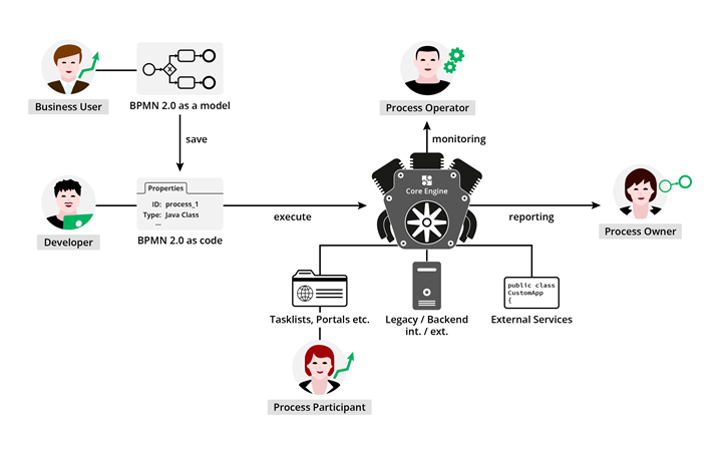
Later on in this week, the modelling and verification of DMN models will be covered, which will be concluded by the simulation and testing of these.
The lecture comprises six video clips.
Fundamentals of technical process models
To make a process model executable, a drawn BPMN model is not sufficient anymore. It requires a technical process model, where the behaviour of all BPMN elements is well defined.Adding executable attributes (tasks)
For different activities, different attributes have to be defined. For example, a User task needs a User Interface and a Decision task needs a Decision model.Adding executable attributes (gateways and events)
After defining the activities, the gateway and event logic needs to be defined. The way, how to choose the correct path at an XOR gateway will be covered for instance.Deploy and run a process
After the whole process is well defined, the process can be deployed. This chapter introduces the Camunda cockpit and explains how to run a process.Demo 1
The first demo shows, how to import a process model from Signavio and how to add technical attributes to activities, gateways and events.Demo 2
The second demo illustrates the deployment of the model and how to step through it.
Organization
As usual, there is a number of self tests , to check your understanding of the lectures. You have as much time as required to solve these tests, you can take them at any time and arbitrarily often.
Please recall: At the end of the week, you need to submit a homework . For the homework you should calculate 30-45 minutes and the homework has a time limit (60 minutes) . Please be advised that this test can only be started ONCE (closing the browser does not stop the timer). In addition, the homework starts when you click on the start button on the homework page . So, only click on the button if you are willing to take the assignment. The achieved score in the homework contributes to your total score for this course. You will be informed about your results and a sample solution is published a day after submission deadline.
If questions arise with regard to the lectures, self tests, or assignments, please use the community forum.
Have fun!
Weekly Schedule
Please be aware of the following dates for this week.
- The homework needs to be submitted latest June 26th , 2019, at 22:00 (10:00 pm) CET. Submission is already open; after consulting the lecture material (videos, slides, and reading material), you can start on the homework right away.
- The solution for this week's homework will be published on Thursday, June 27th , 2019, at 10:00 (am) CET.
- All times are Central European Summer Time (UTC+2). Please check your local time zone. The remaining time until June 26th, 2019, at 22:00 (10:00 pm) can be checked at the provided link.